Relica 2.0 released

Hello restic community!

I’d like to share a major update to Relica, the cross-platform backup service built on restic. Some of you may remember Matt Holt’s original Relica 1.0 announcement from 2018.

A bit of background

I’m Jóhannes Stefánsson, an Icelandic privacy attorney with extensive GDPR experience and a former CISO. In that role, I saw backup software both succeed and fail (sometimes miserably) in real recovery scenarios. Backups were often the only alternative to paying ransoms that made recovery possible at all.

I acquired Relica from Matt Holt and Cory Cooper in 2022. After spending time paying down technical debt and modernizing the stack, I’m happy to announce that Relica 2.0 is now available for Windows, macOS, and Linux.


What’s New in Relica 2.0

This release refreshes the underlying infrastructure while preserving what made Relica useful in the first place: making restic approachable without taking control away from power users.

Performance improvements

The following measurements were taken on Linux using a 10 GB dataset backed up to Wasabi S3. As always, your mileage will vary depending on hardware, network, and backend.

  • Cloud backup throughput: ~51 MB/s → ~92 MB/s (≈80% improvement observed)
  • Restore throughput: 66 MB/s → 105 MB/s (≈60% improvement)
  • Total backup job duration: ~29% faster
  • Low CPU overhead: backups remain unobtrusive during normal use

These gains come from updating components that had fallen behind and from optimizing Relica’s daemon layer, which now adds only ~5% overhead compared to running restic directly.

Much of the improvement is attributable to newer restic features such as zstd compression and pack file optimizations. Where appropriate, Relica uses rclone for transport, while restic remains responsible for encryption, deduplication, and repository integrity.

We’re currently running comparative benchmarks against other backup tools and will publish full methodology and results once testing is complete. Initial comparisons are available here: Compare Backup Solutions - Relica vs Backblaze vs CrashPlan vs iDrive


One Backup, Multiple Destinations

With many backup tools, backing up to multiple locations means managing multiple configurations, schedules, and failure modes.

Relica takes a different approach: you define what to back up once, then attach as many destinations as you need:

  • Local / NAS — fast restores, no internet required
  • Bring Your Own Cloud — S3, B2, Wasabi, R2, and 50+ providers
  • Relica Cloud — managed multi-cloud replication (up to 5 providers) with a single upload
  • Peer computers — a friend’s machine or your own off-site server

All destinations share one schedule and one definition of what’s backed up. Everything remains editable in the UI — or via CLI if you prefer. No scripts or config files are required unless you want them.
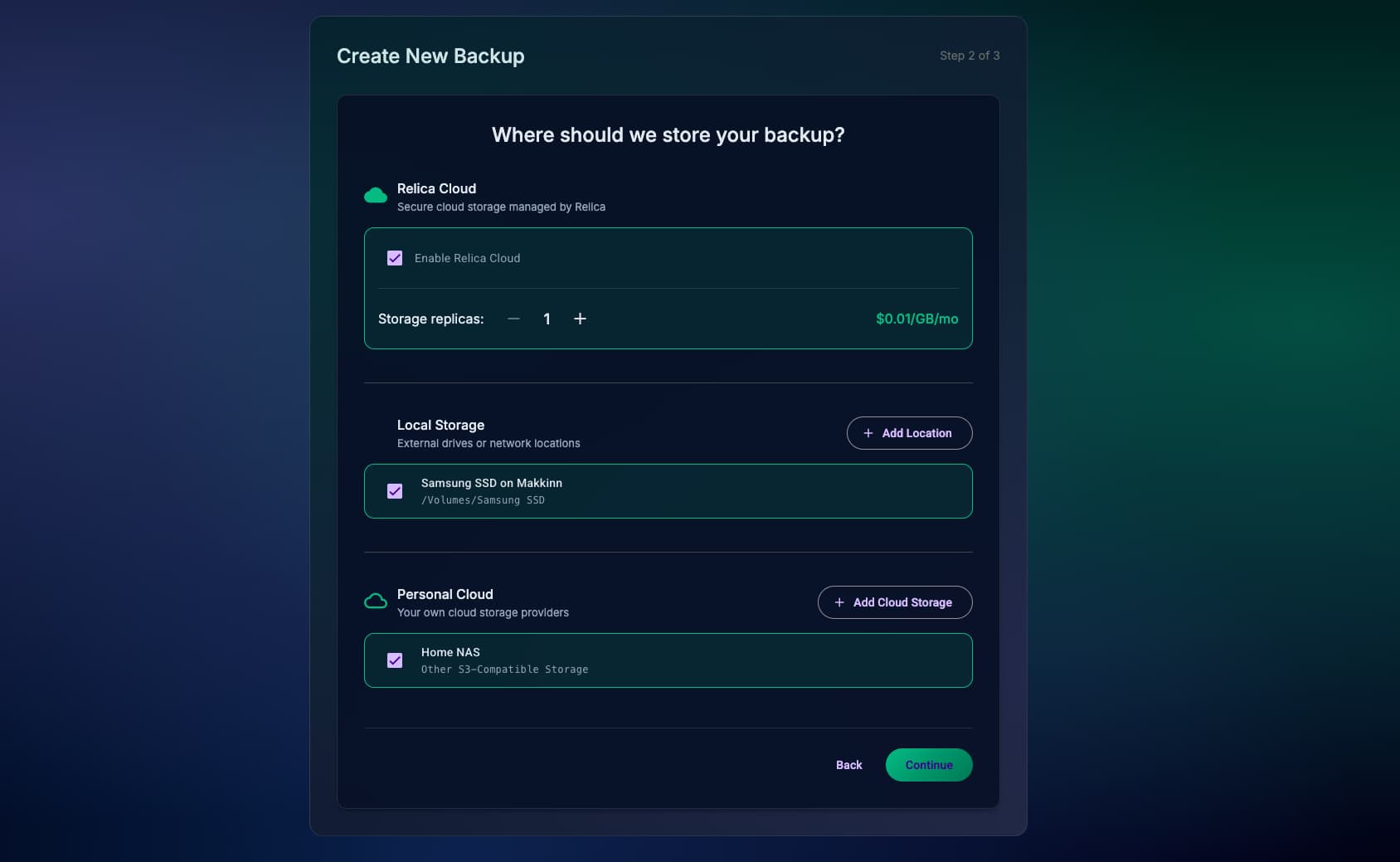

3-2-1 Backup with a Single Upload

Most backup services ultimately store your data in one place. If that provider has an outage, a breach, or disappears, your backup is at risk.

Relica Cloud replicates your data across up to five independent cloud providers, while requiring only a single upload. A 500 GB backup does not require 2.5 TB of upstream bandwidth.

Matt mentioned this exact problem in his original announcement:

“I wanted to back up to multiple cloud providers without uploading my data more than once (we have slow Internet access).”

For many users, bandwidth constraints are still very real.

Advanced users can absolutely implement multi-provider replication themselves using restic and custom tooling. Relica Cloud exists for users who want that redundancy without maintaining glue code, credentials, monitoring, and failure handling.


Redesigned Interface

Relica 2.0 introduces a more opinionated dark-themed interface, including:

  • Guided setup wizard for first-time configuration
  • Real-time progress tracking (files, speed, ETA)
  • Unified dashboard showing backup & destination health at a glance
  • Redesigned restore interface with history and quick actions

Cloud Provider Support

Relica 2.0 supports Cloudflare R2, Wasabi, Backblaze B2, Azure Blob Storage, Google Cloud Storage, and 50+ additional providers via rclone.


Smart CPU Management

  • Manual backups: run at full speed
  • Scheduled backups: default ~25% CPU throttling

Scheduled jobs are incremental and rarely benefit from full CPU saturation, keeping systems responsive while backups complete reliably.


Why restic?

Like Matt noted in the original announcement, restic is exceptionally well-engineered. Some properties I value most:

  1. Relica repositories are standard restic repositories
    You can restore using restic alone if needed. Relica has no proprietary formats or lock-in.
    Documentation: Restoring without Relica - Relica User Guide

  2. Restore-only mode
    Even without an active subscription, Relica allows restores from existing repositories.

  3. Zero-knowledge encryption
    Repository passwords never leave your device.

  4. Deduplication and incremental snapshots
    Only changed data is stored and transferred.

Relica layers scheduling, multi-destination management, a GUI, and optional managed storage on top of restic’s foundation. Where possible, I aim to contribute improvements back upstream.


Quick feature overview

Feature Details
Platforms Windows, macOS (Intel & Apple Silicon), Linux, BSD
Destinations Local, NAS, peer-to-peer, 50+ cloud providers, Relica Cloud
Engine restic 0.18.1
Encryption AES-256, zero-knowledge
CLI Full functionality available
Pricing $60/year or $7/month (unlimited devices)

What’s next

Development priorities are driven by real-world use. I’m particularly interested in feedback from long-time restic users who currently manage multi-destination setups manually.

Feel free to reply here or email support@relicabackup.com.


Stay updated


Restic community launch offer

As a small thank-you to the community that built the engine Relica relies on:

2 years for $60 (normally $120)

Valid until January 20:


Download

30-day free trial, no credit card required.


Thanks to Alexander and all the restic contributors for building such a solid foundation, and to Matt Holt and Cory Cooper for creating Relica in the first place. I’m grateful for the opportunity to continue their work.

I’d love to hear from the restic community. If you try Relica, please let me know what works well (and what doesn’t).

— Jói

6 Likes

hello @joistef good luck with Relica, it seems a nice piece of software.

Just a small notice here that the oldest relica blog articles produce a 404 - Not Found

  • ransomware protection guide
  • 3-2-1 backup rule
  • zero knowledge encryption
2 Likes

Hey @GuitarBilly,

Thanks for your well-wishes and taking the time to look around. Good catch with the blog post links. Looks like they didn’t survive a recent website migration, they’re fixed now :relieved_face::

Relica 2.1.0 released

Quick update: version 2.1.0 is out with immutable backups for Relica Cloud.

(This is the sixth release since December, I’ve been busy.)

What’s new:

  • Immutable mode — 30/90/365-day lock periods. Ransomware can’t modify or delete your backups.
  • Storage size display per destination
  • Dashboard improvements
  • Destinations can now be deleted from the UI

How it works:

Built on restic’s append-only mode, with 4 layers of server-side enforcement. Even if an attacker fully compromises your machine and Relica credentials, they can’t delete snapshots from Relica Cloud. Every layer (client, rclone, central server, proxy) independently rejects prune operations when immutable mode is active.

Disabling immutable mode triggers an email alert as an added security layer and doesn’t take effect until the lock period expires (which is counted from last successful backup). So even if someone tries to turn it off, existing backups stay protected for 30/90/365 days.

Happy to share more technical details if anyone’s interested.

Full changelog: Changelog - Relica Backup Software

— Jói

I’m interested - especially for small companies or individuals that I support.

However, after looking at the website, it is not really clear for me, what is included. Here is what I think my users will get for $5 monthly (if paid yearly)

  • The client application for Windows/macOS/Linux/BSD which I will install
  • Some web UI where I / the user can manage the backups. (e.g. what will be backed up, retention, …)
  • Restore function in the WebUI / Client Application
  • E-Mails for successful and failed backups - and if backups have not happened for a specified time
  • The server application which has to be installed and run by me on some cloud VM (if I am not using the cloud escrow service) - this also enable “immutable mode”.
  • The cost will be the same - regardless of the number of boxes that are backed up and also regardless of anything else (size of the backups, retention, …) if not using cloud escrow.

Is this correct?

Is it also possible to use S3 storage? (without or with limited immutable mode)

By the way, especially for individuals in Europe, it would be good if payment could be done in Euro. Also, debit card adoption is getting better as most newly issued cards (at least in Germany) are having that function now - but there are many users that have not enabled that function, yet. So maybe bank transfer might also be of interest.

Hey @flomp,

Thanks for the interest.

However, after looking at the website, it is not really clear for me, what is included. Here is what I think my users will get for $5 monthly (if paid yearly)

Let me clarify:

What you get for $60/year (5$ month, or $7/month with a monthly subscription):

  • Correct, the subscription is per user, not per device or per GB. Back up as many GB to as many machines and as many destinations as you want.
  • The client application runs on Windows, macOS, and Linux. (BSD is for a legacy client and incorrectly listed on some pages; I need to fix that.)
  • Relica serves its interface via your web browser at localhost. It is intentionally not a cloud dashboard. Your encryption keys and password never leave your machine, which is how we maintain zero-knowledge encryption. You configure sources, destinations, schedules, and retention in this local interface. There’s also a full CLI if you prefer scripting or need to run on headless systems.
  • Restore is done through the client. You can browse snapshots and restore individual files or full directories.
  • Relica Cloud is an optional feature to allow increased redundancy with a single upload to up to 5 providers, but BYOC is fully supported.

Notifications:

Email notifications for failed backups are built in. Success notifications aren’t implemented, but backup hooks let you run custom scripts after each backup completes. You get environment variables like RELICA_HOOK_BACKUP_ERROR so you can send alerts via email, Slack, or whatever you or your clients use.

What you don’t need:

No server application. Relica backs up directly to local drives, NAS (via SFTP/SMB), or cloud storage. There’s no Relica server component to install.

S3 storage:

Yes. Relica uses rclone under the hood, so any S3-compatible storage (AWS, Wasabi, Backblaze B2, MinIO, etc.) is supported. You configure it as a “personal cloud” destination.

For immutability: if you use S3 storage with Object Lock enabled (AWS S3, Wasabi, and Backblaze B2 support this), you get immutability at the storage layer. The provider refuses to delete objects until the retention period expires, regardless of what any client requests. This works today.

Euro and payment methods:

Payments go through Stripe, which handles currency conversion automatically. Your card will be charged in Euro. Most European debit cards work. I’ll look into enabling SEPA bank transfers for those who prefer it.

There’s a 30-day trial available if you want to test it with a few clients before committing: relicabackup.com/download

Let me know if you have other questions.

– Jói

1 Like

Thanks.

No server application. Relica backs up directly to local drives, NAS (via SFTP/SMB), or cloud storage. There’s no Relica server component to install.

Ok, so if I want to have immutable backups then, I have to install rest-server on the destination myself. (This is not a big issue in my case as I have to do the initial setup anyway. Users should be able to check backup execution and do simple restores themselves.)

You’re welcome.

For immutability on your own infrastructure, the option today is S3 Object Lock with compatible storage. You can run something like MinIO on your own hardware with Object Lock enabled, or use Wasabi/B2/AWS. Provider-level enforcement, Relica writes to it like any S3 destination.

SFTP and SMB work for self-hosted NAS but don’t provide immutability at the protocol level.

On rest-server: good timing. I’m adding native REST backend support in an upcoming release. Internally Relica already uses the REST protocol for Relica Cloud, so the groundwork is there. This would e.g. let you run rest-server --append-only on your own infrastructure and point Relica at it directly.

No ETA yet, but I’m actively working on it. If you want, I can let you know when it ships.

– Jói

I’m not sure if I missed something. However, as I understand, the Object Lock has to be renewed periodically for the pack files which still contain relevant data. Restic does not provide functionality for this, yet - or am i mistaken?

Congrats on your project. Just wondering though, how’s this any different from someone having their own vps and setting up rest-server with a mount point to rclone union to multiple S3 or whatever else backend they want to use, pretty much giving a single upload from the client side and the VPS relaying it to everywhere else.

I don’t think you missed anything, and you’re right. Using BYOC with Object Lock currently has that caveat. Restic doesn’t have native Object Lock support yet. Setting a bucket-level default retention works for the initial write, but restic won’t extend retention for pack files that are still referenced by active snapshots. After the retention period expires, those pack files become deletable even if you still need them. Managing this as-is requires external tooling.

For self-hosted immutability, rest-server with --append-only is simpler. It refuses all deletes, period. No retention windows to manage, no renewal headaches. The tradeoff is you can’t prune without temporarily disabling append-only from a trusted admin machine, but for ransomware protection that’s arguably a feature, not a bug.

Having said that, I’ve been looking at the Relica codebase and working on native rest-server support for your use case (and for others with similar needs). Initial tests look good and if nothing goes off the rails during further testing I’ll ship it with other meaningful features and improvements. Hopefully later this week.

– Jói

1 Like

Thanks!

In essence Relica Cloud is just that, so it’s technically not that different. As mentioned in the original announcement:

Relica Cloud was built (alongside the BYOC model) mainly for one reason:

Basically it’s making best-in-class backups with restic, as well as 3-2-1 backups in general more approachable to less tech-savvy users. It’s not aimed at people who are comfortable wiring up rest-server and rclone union themselves, but it’s there for the moms, business owners etc. that need something out of the box that just works.

1 Like