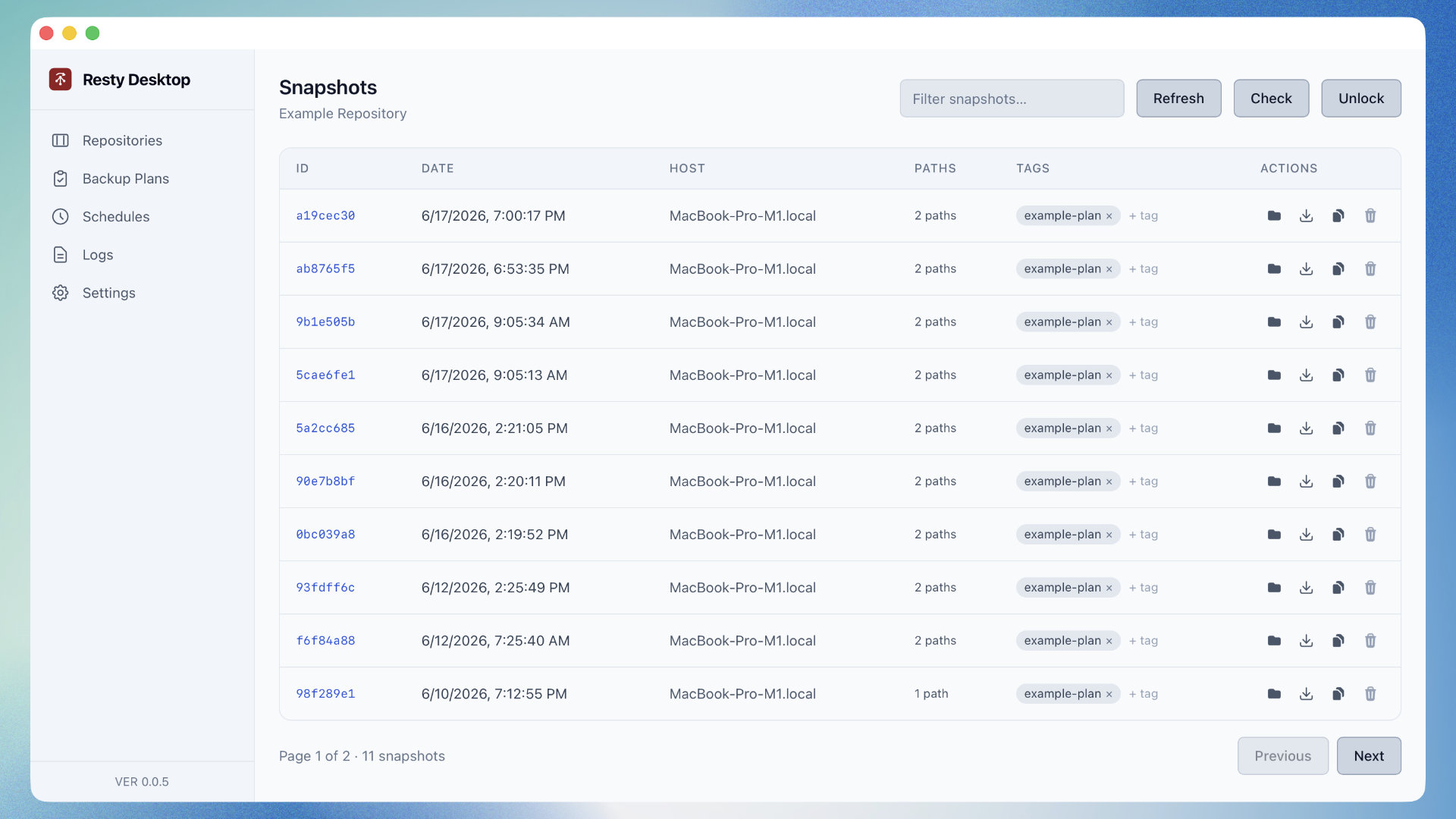
Resty Desktop, GUI for Restic

Hi Everyone!,

Huge fan of Restic.

I tend to use Backrest on my servers, but I had a void on my desktop. The CLI works great, but is a bit cumbersome for what I was using it for.

I decided to create a desktop wrapper called Resty Desktop.

Yes, I did use AI to help me create this application. However, I am a developer and this application is a wrapper. All of the backup and restoration features use the official Restic application. This is just a frontend thrown on top of the CLI with a few extra features like backup scheduling.

The Resty Desktop application uses Tauri which is a cross-platform framework. I only provided a few bundles, but you can easily run the build command for your platform.

So what can you do with Resty Desktop? Here’s a taste:

  • Manage your repositories, whether they are remote, local, or something in-between (Samba).

  • Define backup plans that include paths to back up, retention rules, exclusion rules, and more.

  • Navigate repository snapshots, restore them, copy them to other managed repositories, view stats, etc.

  • Browse files and directories within a snapshot and restore specific items instead of an entire snapshot.

  • Compare snapshots and view or restore from the diff.

  • Schedule backups to run in the background.

So you can use this desktop application as strictly a GUI to Restic or make use of some of the extended features such as scheduled backups.

Happy to accept pull requests and feedback. Please be kind to me though :slightly_smiling_face:.

3 Likes

This looks very interesting. Thanks for sharing your work with us, I’m interested to see how it develops. :slightly_smiling_face:

FYI I did attempt a build on linux (Fedora 44), but ran into a missing dependency issue (Package 'libsoup-3.0' not found). Do you have plans for a linux release, or are you targeting primarily MacOS/Windows for now?

Hi @shd2h,

Thanks for the feedback!

I set up automated builds starting with v0.0.6 which includes Linux. I haven’t done thorough testing on Linux like I have on Windows and macOS, but I don’t see why it wouldn’t work out. I also added build instructions for Linux since the build requirements are slightly different than macOS and Windows.

If you’re able to and willing, please report back if all is good :slight_smile:

Wow, that was fast!

With the additional instructions I was able to build the app successfully (Note: I built against the latest commit, rather than the 0.0.6 tag). The AppImage building step did fail, but the binary/rpm/deb were already built by that point, so I just used the binary for testing.

I did also try the AppImage from the 0.0.6 build, however it didn’t work at all really. Upon opening it, I can see the menu bar, but nothing else, and the options in there are not the same as in the working app (I see File → Reset Application for example).


That aside, from initial testing with the binary the app runs well under Linux and looks really good! :grin:
I haven’t tested all the functionality yet but I did run through the below at least:

  • creating a repository (local back-end)
  • adding an existing repository (local back-end)
  • making a backup
  • browsing a backup and restoring a single file while browsing
  • restoring a backup
  • scheduling a backup*
  • forget/prune of backups (running at time-of-backup, and not
  • adding/removing tags to snapshots

All of the above work well (with one minor caveat with the scheduling), as does adding an existing repository and doing the same. If there’s any functionality in particular you wanted checking over, please let me know.


That minor caveat is that the scheduling doesn’t seem to perform the forget operation if one is defined on the backup plan, only the backup. I’m assuming this is unintentional?

I did also find a minor visual issue - when the system theme is set to default/light-mode, the top menu bar in the app has light-mode colour text but dark-mode background colour. i.e grey text on a black background.

This makes it hard to read and looks a little odd with the rest of the app themed as light-mode. Changing the theme from inside the app doesn’t change the menu bar colours, but changing the system theme to dark-mode does. This might be a Fedora or GNOME thing specifically though, I’m not sure.

Let me know if you’d like issues for the above opened in your github repository, I’m happy to add additional detail/screenshots/etc.


As a more general piece of feedback, I’d find it really useful to be able to see the “paths” when looking at the snapshot list in the repository, even if longer path listings are truncated. Looking at the paths is the primary way I tell backups apart, if more than one backup job from the same host targets the same repository (e.g. if backing up /home/foo and /home/bar individually).


All in all though, seriously impressive, I’m going to spend some time exploring the functionality more fully, but so far I think most everything a regular user of restic would need is already present and working here, and the level of polish seems to be really good.
Kudos!
I hope the feedback is useful (and not too overwhelming! :sweat_smile:)

Hi @shd2h,

Thank you for the in-depth feedback!

I went ahead and installed Fedora 44 in a VM to get a better idea of your experience. A few findings:

  • The dark menu bar is a Linux thing with the libraries being used by Tauri. I went ahead and disabled the menu bar entirely for Linux since it appears to be an uncommon experience to have one.
  • You were right about the retention rules failing in a scheduled automation. This was a bug that affected macOS, Windows, and Linux and has since been fixed.
  • I changed the tray behavior a bit since Tauri has limitations on Linux. Your experience may vary, but it is a limitation I won’t be able to get beyond because of Tauri’s Linux support.
  • For whatever reason, the AppImage isn’t working correctly on Fedora. I have limited Fedora knowledge so I don’t know if it is a Fedora problem or a bug in the project. The RPM file seems to install and work without issues for me.
  • I added another build automation that supports ARM on Linux.
  • You mentioned you’d like to see the backup paths. I realize I didn’t make it obvious, but if you hover over the path counts in the snapshot list, it will show a tooltip with each of the backup paths.

Once again thanks for the feedback! If you’ve got more, please send it my way. If I totally misinterpreted any of your feedback, let me know as well.

I hope you find value in the tool :slight_smile:

1 Like

You’re very welcome. Honestly I didn’t originally intend to do quite so much poking around, but what I saw impressed me, and made me want to keep exploring the features.

Again, thanks for the prompt response and fixes. They all look good/sound sensible to me. Some additional thoughts about the tray behaviour (specifically under linux/gnome):

  • the current tray behaviour looks fine to me from an appearances point of view. While gnome does have a background app indicator, as I understand it, it only works for apps that use xdg-desktop-portal to request background running (Background - XDG Desktop Portal documentation, https://gitlab.gnome.org/GNOME/gnome-shell/-/merge_requests/2624).
  • In my experience not all apps implement it, so your current approach seems fine to me. Put another way, I’m used to the paradigm of “open the app again to interact with it”, rather than opening it from a tray icon, and that not all background running apps are necessarily visible from the desktop.
  • Currently, the app generates notifications (e.g. “backup completed”) when running in the background, which is exactly what I’d expect to see.
  • However, an issue with the current implementation is that every time I open the app, it creates a new background process, which then persists after the window is closed. e.g:
❯ ps -ef | grep restic-gui
user     63502    5131  0 10:28 ?        00:00:02 /usr/bin/restic-gui
user     70073    5131  0 10:31 ?        00:00:01 /usr/bin/restic-gui
user     76993    5131  1 10:33 ?        00:00:13 /usr/bin/restic-gui
user     95876    5131  0 10:47 ?        00:00:01 /usr/bin/restic-gui
user     98875   55430  0 10:55 pts/3    00:00:00 grep --color=auto restic-gui

I’m not sure if the same would mean it is possible to have multiple copies of the app running in the background under windows/macOS as well, meaning multiple tray icons? I did test, and the additional processes don’t seem to result in duplicated backups. So, it’s not ideal behaviour, but I’m also not sure how complicated a fix would be.

Thanks for explaining the tooltip, honestly it was fairly obvious once you pointed it out, and I understand why you’d want to display a fixed “n path(s)” rather than whatever long path a user comes up with!

Hey @shd2h,

I’m going to have to dig around regarding the Linux process duplication. I’m not a Linux power user, so this is uncharted territory for me.

When you notice the process duplication, is this only when the tray is enabled in the settings or does it do the same thing when it is disabled? It should use the same process for all schedules, but just in case it’s not, are you seeing a process for every schedule you create?

You sound a little more proficient than I am, so anything you dig up on the subject, please send it my way :slight_smile:

@shd2h,

I might have fixed it in v0.0.8!

I included a tauri-plugin-single-instance plugin which restores an existing instance rather than creating a new one every time you attempt to launch the application. I think the application was remaining as a background process and you were launching a new process every time you opened it.

I tested in my Fedora VM and I only ever saw one process using v0.0.8 in the activity monitoring application.

I’m hoping you get the same results :slight_smile:

Yep, I can confirm all looks good from my side. With the change, the previous process window is being unhidden, rather than a new process started. Nice work! :slight_smile:

1 Like

I have been running it for a week now and I’m impressed! I’m personally not a friend of Web-UIs and Resty offers a feature set similar to backrest in an actual app.

Furter, Resty-Desktop just implemented indexing and file search in snapshots; IMHO a very unique feature that sets it apart from other UIs or backup apps. If I accidently deleted an imported file or a file has bit rot, I can now actually find it.

Searching across snapshots (e.g. if looking for a certain version of a fileI) would be an awesome further step.

1 Like

Thanks for the kind words @necrevistonnezr !

I’m open to ideas on searching across snapshots rather than within a single snapshot. From an implementation perspective it shouldn’t be too difficult since the indexed data sits nicely in a SQL database. I’m more worried about a UX / UI perspective because it might get messy and confusing for a user real quick.

Keep the feedback coming everyone!

The v0.2.0 release will let you search across snapshots in a repository. You can enter this feature by right clicking a repository in the list and choosing to search. It will only search repositories that have been indexed. The search results will show the latest file or folder, whether that is the latest snapshot or ten snapshots ago.

Enjoy!

2 Likes