Hello,
I performed maintenance on a repository to forget snapshots older than 18 months. I ran the prune command right after. There was no error. I also performed a repository check with –read-data just before and after to be sure the repository is in a good state.
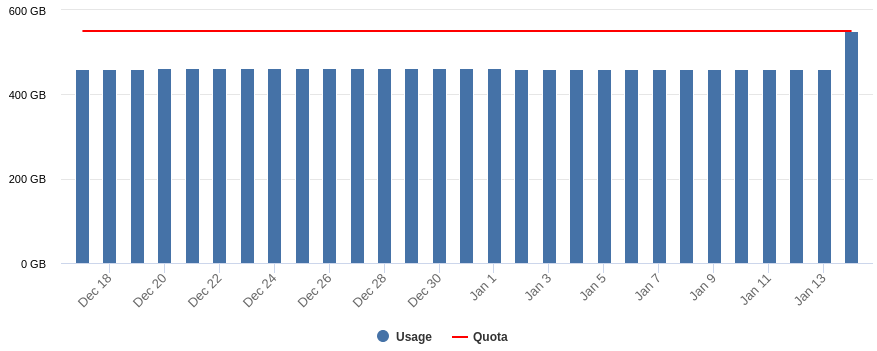
I noticed that the disk usage (ssh backend on rsync.net) increased by nearly 90Gb after those operations. The size jumped from 444Gb to 532Gb.
I was very close to exceed the quota … I don’t know what would have happened if I exceeded the quota. 
Repository compression is set to automatic.
Repository statistics:
# restic --verbose=0 --cache-dir=/opt/backup-tools/var/restic --cleanup-cache stats

repository e2f3bdb6 opened (version 2, compression level auto)
[0:00] 100.00%  8 / 8 index files loaded
scanning...
Stats in restore-size mode:
     Snapshots processed:  307
        Total File Count:  19894274
              Total Size:  78.230 TiB
restic version:
# /usr/local/bin/restic version
restic 0.18.1 compiled with go1.25.1 on linux/amd64
I have a second smaller repository for a different host. That repository is only 17Gb in size. The size barely changed after performing the same operations (forget + prune).
Sizes as reported by ‘du’ before and after the maintenance:
du-before.out:444G	./rsync.net/restic/morgoth
du-before.out:17G	./rsync.net/restic/picloud

du-after.out:532G	./rsync.net/restic/morgoth
du-after.out:17G	./rsync.net/restic/piclou
Any idea what happened ? I expected the size to go down …
Edit: Data usage graph in the rsync dashboard
Edit #2: raw-data statistics
# restic --verbose=0 --cache-dir=/opt/backup-tools/var/restic --cleanup-cache stats --mode raw-data

repository e2f3bdb6 opened (version 2, compression level auto)
[0:00] 100.00%  8 / 8 index files loaded
scanning...
Stats in raw-data mode:
     Snapshots processed:  307
        Total Blob Count:  368715
 Total Uncompressed Size:  270.926 GiB
              Total Size:  266.441 GiB
    Compression Progress:  100.00%
       Compression Ratio:  1.02x
Compression Space Saving:  1.66%
Edit #3: The ‘du’ disk usage statistics I reported are based on the local copy of the repositories I downloaded.
Could it be that your storage provider stores deleted files (in order to offer recover operations) and accounts that to the storage usage? prune typically repacks pack files which means it creates new ones and deletes old ones..
rsync.net provides some “free“ ZFS snapshots (they do not count against your disk quota) but if you configured some extra ones then it is unfortunately not the case and any deleted data is not really deleted until such snapshots are destroyed.
All accounts have seven daily snapshots free of charge. Accounts larger than 100TB have an additional four weekly snapshots.
You may add any arbitrary schedule of days, weeks, months, quarters - and even years - which count against your paid quota.
so check this part of your rsync.net account configuration. It has nothing to do with restic IMO.
It is a SSH/SFTP backend accessed with rclone on RSYNC.NET. It is a “raw” UNIX access and I’m not aware of any feature to recover deleted files.
The disk usage difference is also see with a copy of the repository I downloaded locally.
In fact, the “du” space usage I reported are for the downloaded copy of the repository too.
Then run prune again and post output here. Maybe it will reveal a bit more.
Here’s the prune output with increased verbose level
# restic --verbose=2 --cache-dir=/opt/backup-tools/var/restic --cleanup-cache prune

repository e2f3bdb6 opened (version 2, compression level auto)
loading indexes...
[0:00] 100.00%  8 / 8 index files loaded
loading all snapshots...
finding data that is still in use for 307 snapshots
[0:02] 100.00%  307 / 307 snapshots
searching used packs...
collecting packs for deletion and repacking
[0:04] 100.00%  17188 / 17188 packs processed

used:             368715 blobs / 266.441 GiB
unused:            23927 blobs / 14.020 GiB
total:            392642 blobs / 280.461 GiB
unused size: 5.00% of total size

to repack:             0 blobs / 0 B
this removes:          0 blobs / 0 B
to delete:             0 blobs / 0 B
total prune:           0 blobs / 0 B
remaining:        392642 blobs / 280.461 GiB
unused size after prune: 14.020 GiB (5.00% of remaining size)

totally used packs:      11592
partly used packs:        5596
unused packs:                0

to keep:           17188 packs
to repack:             0 packs
to delete:             0 packs
done

#
I ran check against the local copy of the repository and got a lot of message like this (~27k lines):
pack 329fd92edca5d646045428d36a00e9b72e88f77e1c9c0ae0d8735eded57b27ee contained in several indexes: {2a34d7ab 3797c3d1 69c14014 77946220 90be927e f34da56d}
I use the rsync command to download the repository and it turns out I forgot the –delete option to remove local files that no longer exist on the remote server.
I downloaded the repository again with the –delete flag this time. It did remove a lot of files. So many that the local copy size dropped down from 444Gb to 280Gb. The error above didn’t appear when I ran a check against the new local copy.
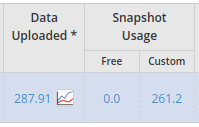
So it seems to be really something on rsync.net side. I checked my account settings and I do have snapshots configured and the dashboard seems clear: 287Gb of data with 260Gb for snapshots
So it looks like @kapitainsky was right suspecting something with rsync rather than restic. My current understanding is that the size increase is due to the re-written data in the repository. The space usage I expected will only go down once those snapshots no longer reference the removed files.