Hi Team,
First, a big thank you to the team for this tools and supporting new users in this forum.
Second, a big thank you for the quality of the documentation ! I almost read all, understood a significant part of it.
I am a new user and have not backed up yet as I try to understand how I should do. I make this post for new users like me so pardon the lack of interest for advanced users…
I was wondering what PACK_SIZE should be used. I search on the web and this forum. In very short, there is one advice and several recommendations :
- Recommendations : from 8 Mb till 2 Gb, mainly in the range 16 → 256 Mb.
- Advice : test some values and pick the best one.
So I tested. TL;DR: default value may be a very good pick to start with.
A bit of background to understand the context of my case :
- Backup personal data (about 500 Go) onto a USB HDD and then copy from this USB HDD to a distant PC to build a light 3-2-1 backup strategy.
- No cloud backup except for a few critical files onto a cloud but this is manual transfer.
- I want to perform frequent backup, roughly 1 per week, so speed matters more than space (at least where I stand today in the journey).
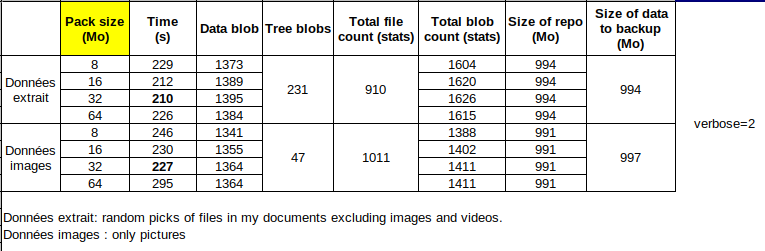
I isolated 2 sets of 1 Gb of data (1 only pictures and 1 documents but no pictures and no movies). I started testing PACK_SIZEin the range 8 → 64 Mb to get a feeling. I create one repo per parameter per set of data, run the backup redirecting the output to a text file and making size measurement and stats. I gathered all this in a table enclosed in this post . Surprise! Not so much change on the time to back up and size of repository of backup data. After diving a bit more, my understanding is that data is split in blobs (encrypted and compressed binary file) which are “merged” into a pack (hence pack size) so the amount of blobs of fixed size is almost the same. Time to back up is quite similar for PACK_SIZEin the range 8 → 64 Mb. Actually, it should not have been a surprise, if I had understood the process better. So I assume this parameter is more important when working remotely.
Conclusion for my case : 16 Mb or 32 Mb for a gain of 3 seconds / Gb of data 
Feel free to correct any errors and share you views.
Side note 1 : it is a very good practice before starting real backup on your data and hardware.
Side note 2 : DO USE environment variables. I took me one day to understand what it was and how to set them up in my .bashrc, but definitely worth it. So handy, so fast, no typo, your fingers will thank you.