Backup only 1% smaller than the original

> restic version
restic 0.18.1 compiled with go1.25.1 on windows/amd64

Somehow my ~11TB backup that took 24 hours ended up being essentially the same size as the original data despite deduplication and max compression. Here’s the command I used:

> restic --repo MyBackup --compression max --option local.connections=1 --read-concurrency 1 backup --no-scan E:\Archive E:\Docs E:\Media...

Strangely enough, it seems auto compression was used despite me specifying max?

> restic --repo MyBackup stats --mode restore-size latest
enter password for repository:
repository 7e3b08e1 opened (version 2, compression level auto)
[0:09] 100.00%  203 / 203 index files loaded
scanning...
Stats in restore-size mode:
     Snapshots processed:  1
        Total File Count:  1383286
              Total Size:  10.990 TiB
> restic --repo MyBackup stats --mode raw-data
enter password for repository:
repository 7e3b08e1 opened (version 2, compression level auto)
[0:08] 100.00%  203 / 203 index files loaded
scanning...
Stats in raw-data mode:
     Snapshots processed:  1
        Total Blob Count:  8932672
 Total Uncompressed Size:  10.716 TiB
              Total Size:  10.607 TiB
    Compression Progress:  100.00%
       Compression Ratio:  1.01x
Compression Space Saving:  1.01%

Is this just a case of unrealistic expectations or did I mess up somewhere? I know for a fact there are dupes and near-dupes on the drive, and all the deduplication and compression benchmarks and posts I came across show far better savings, even ones where restic didn’t come out the winner.
Please paste the output from the backup command run.

Also, what data is that? Seems like a lot of binary and hard to compress and deduplicate data, even if you say you have some of that too.

Is the output saved anywhere? I checked in AppData\Local\restic for logs but couldn’t find any.

Are things like docx and pdf considered binary? It’s a mix of documents and media. Although the majority of space is definitely taken up by media (pictures, audio, video).

Restic outputs to standard out. If you execute restic in the terminal, you will see the output there, like in your examples. If you execute restic some other way, where the output ends up is entirely up to you or that other way – restic just emits output and whatever calls or executes it is responsible for making use of that output.

Generally speaking, as you probably already know :), binary files are not very compressible, and if I’m not mistaken .docx files are already zipped up or something like that (you can open a .docx file in a plain text editor to check this yourself).

If I were to guess this is simply a matter of the data you backed up not being very suitable for deduplication and compression. Media files generally don’t compress or deduplicate well. I don’t see anything obviously wrong anywhere.

Regarding compression, I’m pretty sure that you did get max compression, because the compression level is specified per command, so if you specified max compression when you ran the backup then that ought to be what was being used. The output from that run would say which level was used.

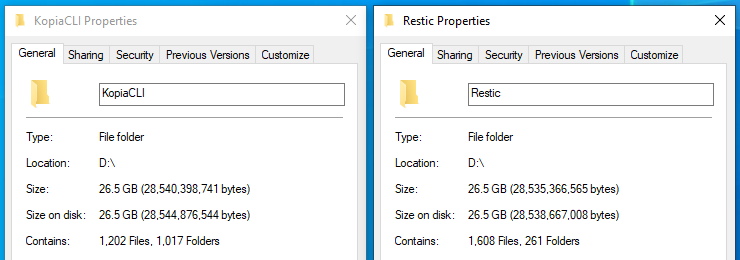
Yeah you right I think. I did a comparison with Kopia (zstd compression), and Kopia’s repo ended up being even slightly larger:

Not very relevant to the question but Kopia also took longer and made my drives make really weird noises :eyes:

But in either case there’s basically no difference from the original size.

2 Likes

Thank you very much for verifying this in detail, so that we know for sure :slight_smile:

1 Like

The compression works only when the data is compressible. But nowadays, a lot of files we deal with aren’t compressible. For example, all Microsoft Office files (docx, xlsx, pptx and so on) are in fact a bunch of XML files zipped, so they are already compressed. Image files like PNG, JPG, WEBP, sound files like MP3, M4A, FLAC and video files like MKV, MP4, MOV are already compressed.

With this knowledge, in my computer I know that the only folder that will compress well is the one I have some code I wrote. Code are text files and compress very well. Also, configuration files usually are just text and also compress well.

As you can see, my repository got an overall compression rate of about 11%, which I think is pretty good for the kind of data I have.

❯ restic stats --mode raw-data
repository d253be61 opened (version 2, compression level auto)
[0:01] 100.00% 55 / 55 index files loaded
scanning…
Stats in raw-data mode:
Snapshots processed: 90
Total Blob Count: 1617776
Total Uncompressed Size: 921.012 GiB
Total Size: 816.416 GiB
Compression Progress: 100.00%
Compression Ratio: 1.13x
Compression Space Saving: 11.36%

About deduplication, it work wonders, but we need to understand how it can deduplicate things. You run the stats backup with the option `--mode restore-size latest` so you are getting the size of the last snapshot and comparing with your full backup repo later with `–mode raw-data` and as expected the sizes are kinda similar.

This happens because the only way Restic can reduce the size of what you are backuping up without losing data is compressing it, unless you have the same files on your computer multiple times, which I think most people don’t have.

But if you run Restic without the `mode restore-size latest` and let it sum the sizes of all snapshots, the result is astonishing. Here is mine:

❯ restic stats
repository d253be61 opened (version 2, compression level auto)
[0:01] 100.00% 55 / 55 index files loaded
scanning…
Stats in restore-size mode:
Snapshots processed: 90
Total File Count: 22668751
Total Size: 13.446 TiB

As you can see all the snapshots are 13 Terabytes in size, but on disk the use about 820 Gigabytes. You also notice I have about 90 snapshots saved. Every time on those 90 snapshots the backup run, it didn’t copy data that is repeated, allowing me to have 13 TB worth of snapshots with less than 1TB.

I also get advantage of the deduplication feature by backing up more than one computer into the same repository. There are a few folders I keep in sync between my desktop and laptop, as an example, the Keepass database folder. These sync folders are deduplicated as the data from one computer isn’t repeated when the other does the backup. They account for a fez dozen of gigabytes Restic don’t have to save twice, and I don’t have any headache to restore if needed.

So try to run `restic stats` and you’ll notice that after several snapshots the growth in the repository will be minimal.

2 Likes

Thanks for the useful contributions in this topic. However it does not address the compression ratio question of @mlpenjoyer:

Strangely enough, it seems auto compression was used despite me specifying max?

Restic documentation for compression states that compression ratio need to be set (and therefor can be different) for each backup run.

  • The stats repository compression is listed as auto since it can have multiple values, but that does not give any information (on the actual set compression).
  • The status of set compression ratio of a single snapshot stats could be shown. In case you want to verify your backup or forget or wrongly set it, one can prune a snapshot and recreate it with another compression for example.

Question for developers, is this a bug or a feature?
Looking at json-output i guess it is not stored.
I ran a quick test with a fresh repo and can only see it at the commandline output during backup:

ubuntu@x300server:/tmp$ rm -r ./restic.compression.repo/
ubuntu@x300server:/tmp$ restic init
created restic repository 3dfe1173f1 at /tmp/restic.compression.repo
Please note that knowledge of your password is required to access
the repository. Losing your password means that your data is
irrecoverably lost.
ubuntu@x300server:/tmp$ restic backup --compression=off /home/ubuntu/zombie/
repository 3dfe1173 opened (version 2, compression level off)
created new cache in /home/ubuntu/.cache/restic
no parent snapshot found, will read all files
[0:00]          0 index files loaded

Files:           3 new,     0 changed,     0 unmodified
Dirs:            3 new,     0 changed,     0 unmodified
Added to the repository: 18.602 KiB (17.941 KiB stored)

processed 3 files, 16.395 KiB in 0:00
snapshot d2d5cb5f saved
ubuntu@x300server:/tmp$ restic stats --mode raw-data
repository 3dfe1173 opened (version 2, compression level auto)
[0:00] 100.00%  1 / 1 index files loaded
scanning...
Stats in raw-data mode:
     Snapshots processed:  1
        Total Blob Count:  7
 Total Uncompressed Size:  18.820 KiB
              Total Size:  17.673 KiB
    Compression Progress:  12.39%
       Compression Ratio:  1.97x
Compression Space Saving:  6.10%

But this is confusing since there is compression saving with --compression=off?
Fore completeness I recreated my trial with --compression=max and there is more savings:

ubuntu@x300server:/tmp$ restic stats --mode raw-data
repository 0c9fb393 opened (version 2, compression level auto)
[0:00] 100.00%  1 / 1 index files loaded
scanning...
Stats in raw-data mode:
     Snapshots processed:  1
        Total Blob Count:  7
 Total Uncompressed Size:  18.820 KiB
              Total Size:  3.984 KiB
    Compression Progress:  100.00%
       Compression Ratio:  4.72x
Compression Space Saving:  78.83%

Longer story than intended but I second @mlpenjoyer initial question to want to verify restic compression setting versus actual (reported) performance.

The output repository xxxxx opened (version 2, compression level LEVEL) shows the compression level given when calling exactly that command that opened the repository. It has nothing to do with the compression level used for storing data in the repository (or the fact if data is compressed at all) - unless you called the backup command in which case it applies to the data added by this run.

@alexweiss thanks for that insight and you are right, if I re-run the stats command with a compression argument it shows the intention:
afbeelding

Can you confirm that currently there is no way after backups are completed to find out from the repository which compression was used for a certain snapshot?

You cannot determine which compression level was used for any blob saved in the repository as this information is simply not stored. You can only determine whether a blob is compressed or not.

About snapshots: A snapshot references multiple blobs and if you run backup only blob which are not present are added. So, if you run backup with a given compression level, only the newly added blobs are saved with this compression level. Therefore a snapshot can reference blobs with multiple compression levels - even some blobs could be compressed and others not.
